- Out-of-Stock
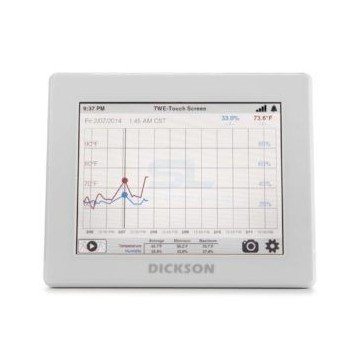

The Dickson TWP touchscreen data logger displays readings and measurement history on an 8-inch colour screen. Configure it for temperature, humidity or differential pressure monitoring using compatible replaceable sensors.
Check current conditions and review recorded measurements at the point of use. The Dickson TWP touchscreen data logger combines an 8-inch display with replaceable sensor options for temperature, humidity or differential pressure.
Choose the sensor configuration around the equipment or area you need to monitor. For a refrigerator, storage room or controlled space, identify the required measurement range and alarm limits before selecting the logger and probes.

View readings and historical data directly on the touchscreen. Audible and visual alarms provide local indication, while USB download allows recorded data to be retrieved for review.
Wi-Fi or Ethernet connectivity supports DicksonOne cloud monitoring. Remote phone, text and email notifications require the appropriate DicksonOne subscription and configuration.
Decide how your team will use the records: checking conditions beside the equipment, reviewing downloaded files or receiving remote notifications. Include these requirements when requesting a quotation.
| Sensor option | Selection considerations |
|---|---|
| Temperature and humidity | Specify the room conditions, required accuracy and sensor location. |
| Thermistor temperature | Define the equipment range, probe arrangement and whether a buffered probe is required. |
| Type K thermocouple | Check the probe rating, measurement range and installation conditions. |
| Platinum RTD | Provide the required temperature range and accuracy for the complete measurement setup. |
| Differential pressure | Specify the pressure range, units and connection points. |
Measurement range and accuracy depend on the selected sensor. Confirm the exact sensor part number and compatibility when ordering or replacing a probe.

| Feature | Details |
|---|---|
| Display | 8-inch LCD touchscreen |
| Sensor system | Replaceable sensors |
| Local alarms | Audible and visual |
| Connectivity | Wi-Fi, Ethernet and USB download |
| Backup power | Rechargeable backup battery |
| TWP operating temperature | 0 to 60°C, logger only |
| Enclosure rating | IP21 |
Keep the logger within its operating limits, even when the connected probe measures a much colder or hotter environment. For refrigerator and freezer installations, check the probe cable route and available access before deciding where to mount the display.
Contact us for pricing and availability. Include the quantity, measurement parameters, required ranges and whether DicksonOne cloud monitoring is needed. For an existing system, send the logger and sensor part numbers so the configuration can be checked.